
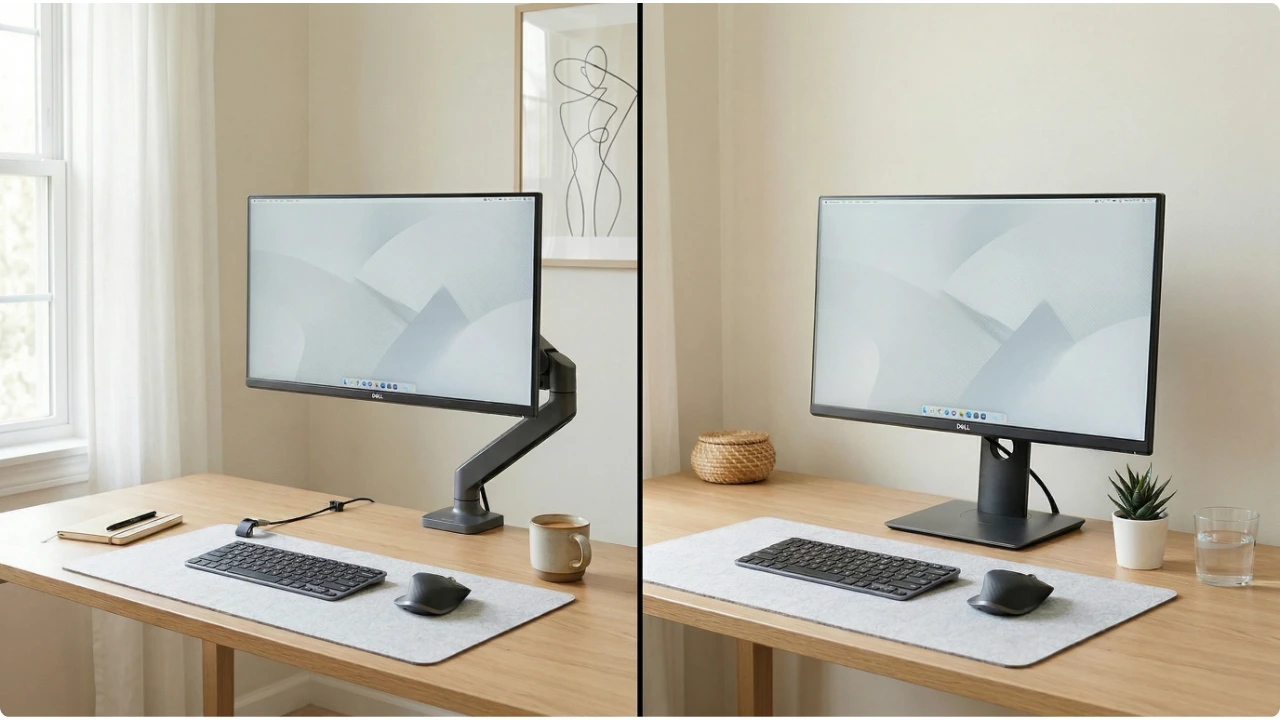
A monitor arm promises a cleaner desk and better posture. A monitor stand promises simplicity and stability. Both deliver — but not for every setup, every desk, or every user.
The difference between a monitor arm and a monitor stand is straightforward on paper. In practice, the right choice depends on the desk, the monitor, the room, and how the workspace gets used from day to day.
Neither option is universally better. But for most home office setups, one tends to fit considerably more naturally than the other — and the wrong choice is easy to make without knowing what to look for.
What to Consider Before You Buy
What Each Product Actually Is
A monitor stand is a platform or riser that sits on the desk surface and raises the screen to a more comfortable viewing height. Most are fixed in height, some offer limited adjustment, and all of them are simple to set up — place it on the desk, put the monitor on top, and the job is done. No tools, no clamping, no compatibility checks required.
A monitor arm attaches to the desk itself, either by clamping to the edge or passing a bolt through a grommet hole in the surface. The monitor mounts to the arm via a VESA plate on the back of the screen. Once installed, the arm holds the monitor off the desk entirely, allowing it to be repositioned — height, depth, angle, and sometimes rotation — quickly and without tools.
The practical gap between them is larger than it first appears.
Ergonomics and Eye Level
Both options raise a monitor higher than a flat desk surface, which is the minimum requirement for a screen position that does not place stress on the neck across a working day. The difference is in how precisely that height can be set, and whether it can be changed.
A fixed stand puts the screen at one height. If that height suits the user, the chair, and the desk, it works well. If it does not — because the chair height changes, because a second person uses the same desk, or because the ideal position turns out to be slightly different from where the stand places it — there is no adjustment available.
A monitor arm allows the screen to be set at exactly the right height and repositioned whenever the situation changes. For anyone who moves between sitting and standing, shares a desk, or simply wants to dial in their screen position precisely, that flexibility has genuine ergonomic value.
The connection between proper screen positioning and reduced neck and shoulder strain is well established, and an arm makes it easier to maintain that position consistently.
Desk Space and Cable Management
This is where the monitor arm makes its clearest argument.
A monitor stand occupies the desk surface. Even a slim riser takes up desk space, and anything stored beneath it — which is a common workaround — is not easily accessible. On a small desk, that lost surface area is a real constraint.
A monitor arm removes the monitor’s footprint from the desk entirely. The screen floats in front of the user, the desk surface beneath it is clear, and the overall setup feels considerably more open. For compact home office desks, that recovered space often justifies the cost of the arm on its own.
Cable management tells a similar story. A stand does nothing to address the cables running from the monitor to the desk. An arm — particularly one with internal cable routing — keeps those cables off the surface and out of sight, which contributes to a cleaner setup without requiring additional cable management accessories.
Adjustability
A monitor stand offers limited or no adjustability. Some models include a range of fixed height positions. Very few offer meaningful tilt or swivel beyond what the monitor’s own built-in stand provides.
A monitor arm offers full repositioning. Height, forward and back depth, tilt, swivel, and on many models full rotation to portrait orientation.
For users who reference documents alongside a screen, work across multiple tasks that benefit from different viewing distances, or simply want the option to move the monitor out of the way when the desk is being used for something else, that range of movement is useful rather than merely impressive.
Dual monitor setups benefit particularly from arms. Positioning two screens at matching heights, at the correct distance, and angled inward at a consistent degree is straightforward with arms and surprisingly difficult with stands, particularly on a desk without much depth. Anyone building a dual monitor setup on a smaller desk will find the geometry considerably easier to manage with arms than with two individual stands.
Stability, Desk Fit, and Monitor Compatibility
A stand is stable by default. It sits on the desk, the monitor sits on it, and there is nothing to flex, loosen, or shift. Heavier monitors are generally more stable on a stand than on an arm, particularly arms at the lower end of the price range.
A monitor arm introduces variables. The clamp must fit the desk edge — thickness, material, and whether there is sufficient clearance at the rear all affect whether a standard clamp will work. Grommet mounting is more secure but requires a hole in the desk surface, which is not always present and not always an option.
Before purchasing an arm, it is worth checking two things.
1. The VESA compatibility of the monitor — the bolt pattern on the back of the screen, typically 75x75mm or 100x100mm, must match the arm’s mounting plate.
2. The monitor’s weight against the arm’s rated load capacity. Most monitors have their weight listed in the specifications on the manufacturer’s website. Arms have a maximum load rating, and running close to or above that limit affects both stability and the arm’s ability to hold a set position over time.
A Note for Renters with Space Constraints
Some arms are designed for wall-mounting rather than clamping, and some landlords have restrictions on drilling into the walls.
Clamping a monitor arm to a desk edge requires clearance at the rear of the desk — typically several centimetres between the back edge and the wall. In a small room where the desk sits flush against the wall, that clearance is not available, and a rear-mounted clamp simply will not fit.
The workaround is side-mounting the arm to the desk edge. This works mechanically, but introduces a different problem: the arm needs sufficient reach to bring the monitor in front of the keyboard.
A short arm mounted to the side of a standard desk may leave the screen positioned to the side rather than directly ahead, which reintroduces the neck rotation the arm was supposed to eliminate, if the goal was to improve ergonomics, rather than just free up space.
For renters in student accommodation or small flats where wall mounting is not permitted and desk positioning is constrained, a monitor stand is often the more practical choice — not because it is better, but because it is the option that actually works in the space available.
Cost and Long-Term Value
A monitor stand is the lower-cost option at the point of purchase. A basic riser costs very little, and even adjustable stands with a useful range of height positions are reasonably priced.
A monitor arm costs more upfront. Quality varies considerably across the price range, and an arm at the lower end may struggle to hold a position over time — gradually drifting down or forward until it needs to be retightened. Spending a little more for an arm with a robust gas spring mechanism tends to produce a result that holds its position reliably for years.
The long-term value case for an arm is strongest for users who stay at the same desk for extended periods, because the ergonomic and desk-space benefits compound across that time.
For a temporary setup or a home office that changes frequently, the simpler case for a stand is harder to argue against. Anyone looking at the best monitor stands for a desk will find options that deliver the core benefit — a screen at the right height — without the installation considerations an arm introduces.
Who Should Choose Which
A monitor arm suits someone who wants full flexibility over screen positioning, is working on a desk with accessible edges and sufficient rear clearance, has a monitor with VESA mounting on the back, and expects to use the same setup consistently over time.
A monitor stand suits someone who wants a simple, stable solution with no installation requirements, is working in a rented space or a constrained desk position, has a monitor without VESA support, or is setting up a workspace that may need to change.
A Simple Decision Checklist
Before buying either, it is worth working through these questions.
- Does the desk have accessible edges and clearance at the rear — or does it sit flush against a wall?
If the latter, a rear clamp will not fit and side-mounting may not bring the screen to the right position.
- Does the monitor have VESA mounting points on the back?
Without them, an arm may not be compatible.
- What is the monitor’s weight?
Check it against the arm’s load rating before purchasing.
- Is the desk surface thick enough for a standard clamp?
Most clamps accommodate a range of thicknesses, but unusually thin or unusually thick surfaces can cause problems.
- Is the setup permanent or likely to change?
A stand is easier to move, reconfigure, or take to a different location without any reinstallation.
Answering those questions tends to make the choice straightforward — and avoids the most common mistake, which is buying the option that looks better in a photo without checking whether it will work in the space you need it to work.