
Standard computer mice are designed for functionality. An ergonomic mouse keeps the functionality and bakes in some mechanics to make it comfortable to use!
Computer work is less physically demanding than other jobs — but it still puts a heavy load on smaller tendons. Wrist pain is among the most common complaints of desk workers, and the mouse is often where the problem starts.
A standard mouse sits low on a desk. So low that your wrist is scraping along the mouse mat and your fingers are raised off it. That upward wrist externsion is the problem. The sustained extension from that position puts continuous tension on the tendons.
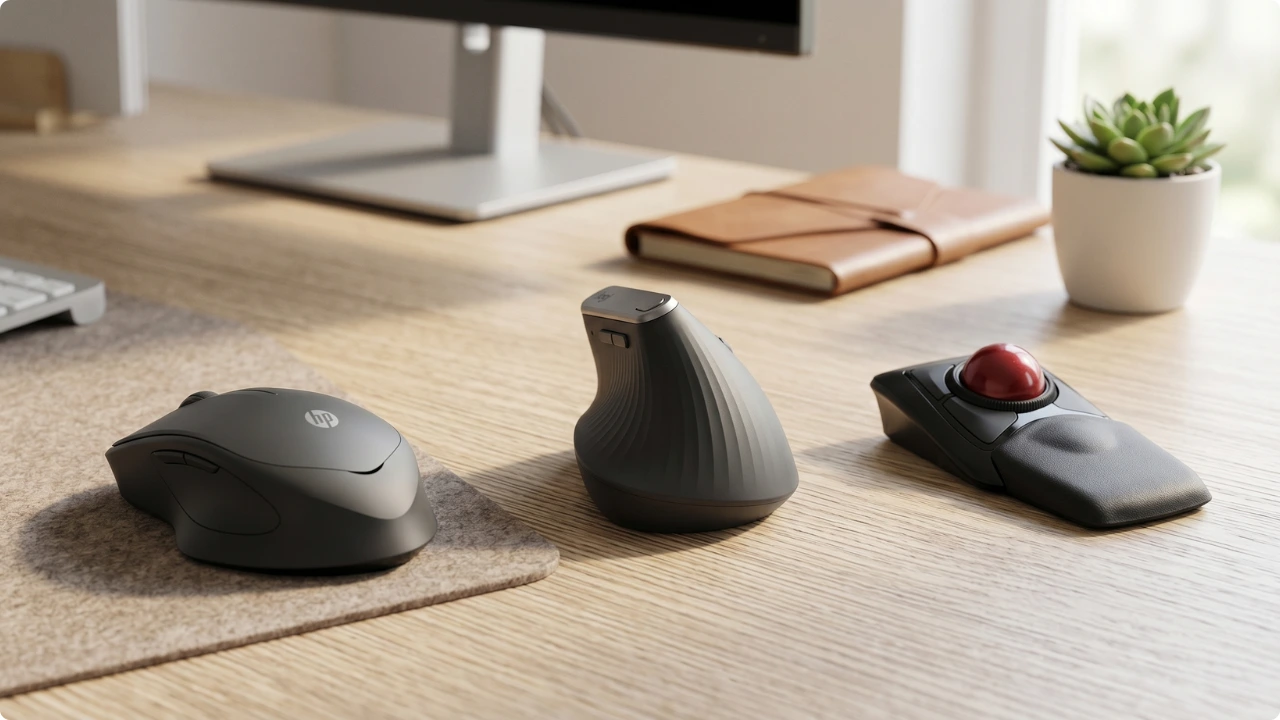
Ergonomic mice address that in different ways.
- A vertical mouse rotates the wrist from palm-down to a handshake position, eliminating forearm pronation.
- A trackball mouse keeps the hand still and moves the pointer with the thumb or fingers, removing wrist and arm movement entirely.
- A light-click ergonomic mouse uses a contoured shape and reduced-force clicks to lower the finger and grip tension that builds up over a long session — without changing how the mouse feels to use.
The Best Ergonomic Mice for Wrist Pain (by Type)
Best Ergonomic Vertical Mouse for Wrist Pain
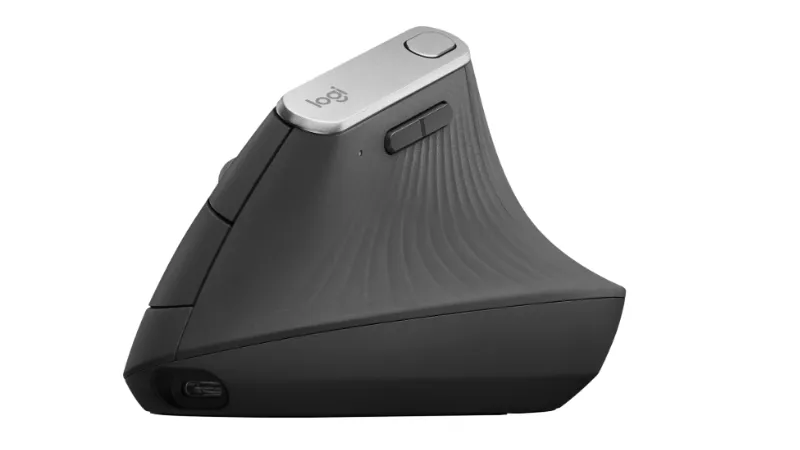
Logitech MX Vertical (or the Lift for Smaller Hands)
Best for: Desk workers dealing with wrist pain, RSI, or forearm strain.
Why it stands out:
The MX Vertical was the first vertical mouse built for mainstream desk workers rather than the specialist market. Vertical mice existed before it — Evoluent have been making them since 2002 — but those were correction tools with a steeper handshake angle and a longer learning curve. The MX Vertical brought the design to people moving across from a standard mouse for the first time.
The detail that sets it apart is its 57° angle, chosen through expert-led ergonomic testing as the point that reduces forearm pronation while keeping the pointer stable and precise — and a gentle enough transition that a standard-mouse user adapts quickly rather than fighting it.
Pros:
- Effective at reducing wrist and forearm pain
- 57° angle backed by ergonomic research and expert endorsement
- Connects via Bluetooth or USB Unifying Receiver — up to 3 devices with Logitech Flow
- Up to 4-month battery life; 1-minute quick charge gives 3 hours of use
- USB-C charging — can be used wired while charging
- Customisable buttons via Logi Options+ software
Limitations:
The MX Vertical suits medium to large hands. Smaller hands will struggle to reach across it comfortably, and the strain it’s meant to relieve can end up worse rather than better. Anyone in that position is better served by the Logitech Lift, which uses the same 57° angle in a smaller body, adds quieter clicks and a faster SmartWheel, and has a left-handed version available.
Getting the most from the customisable buttons means installing Logitech’s Logi Options+ software, which is heavier than it needs to be and prone to the occasional memory leak or profile reset after an update.
The mouse doesn’t depend on it, though: the built-in Windows and macOS drivers handle everything out of the box, and for button remapping, a lightweight free tool like X-Mouse Button Control on Windows or MacMouseFix on Mac does the job without sitting on system memory.
The main buttons use older mechanical micro-switches rather than optical ones, and a known fault can develop with heavy use — typically between 15 and 24 months — where a press stops registering continuously, causing dropped drags or accidental double-clicks.
UK and EU buyers are well covered here, with a two-year manufacturer warranty that applies regardless of retailer; US buyers get only one year, so a failure around the 15-month mark can fall outside the window.
Key Specs:
- Connection: Bluetooth / 2.4GHz USB Unifying Receiver
- Battery: Up to 4 months; 1-min quick charge = 3 hrs use
- Compatibility: Windows, macOS
- Hand orientation: Right only
- Tilt angle: 57°
Verdict:
The MX Vertical has been the reference point for ergonomic vertical mice since 2018, and little has changed because little has needed to. The 57° angle does what it’s designed to do, the battery life is genuinely strong, and the multi-device support makes it practical for a home office running one to three devices.
For its intended user — a right-handed desk worker with medium to large hands and wrist or forearm strain from long hours at the computer — it remains the most natural place to start.
Check today’s price on AmazonIf your hands are on the smaller side, the Logitech Lift covers the same ergonomic ground in a more compact form.
Best Ergonomic Trackball Mouse for Wrist Pain
Kensington Expert Mouse® (Wireless)
Best for: Users with severe joint pain, carpal tunnel, or shoulder injuries who need a zero-movement desktop solution.
Why it stands out:
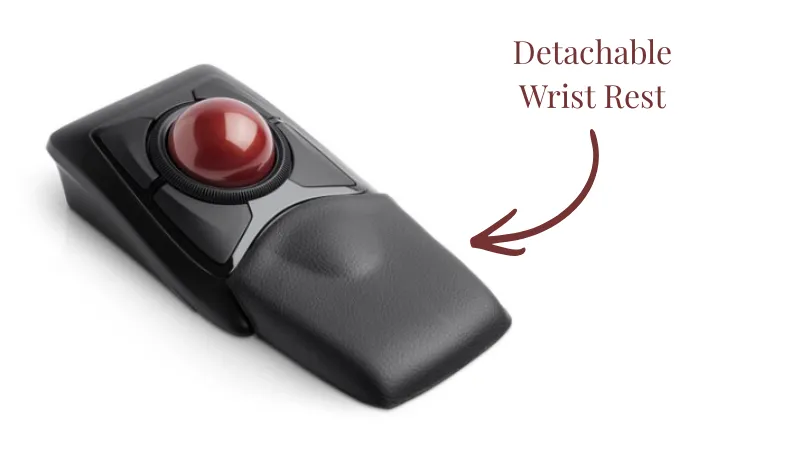
Most ergonomic mice reduce the strain of moving a mouse across a desk. The Kensington Expert Mouse removes that movement altogether. The 55mm ball stays fixed in place and the fingers move the pointer, so the wrist and arm stay still throughout.
For users whose pain comes from hours of mousing across a surface, that’s a fundamentally different proposition to other types of ergonomic mice.
The benefit reaches further up the arm. A standard mouse pulls the arm outward across the desk, and that repeated sweep keeps the shoulder and upper-back muscles under constant load — the source of the ache often called “mouse shoulder”.
Because the trackball mouse never moves, it can sit right beside the keyboard with the upper arm hanging relaxed, taking strain off the shoulder and neck as well as the wrist.
The large, low-force buttons add to that. They take very little pressure to register and can be pressed with the side of a thumb as easily as a fingertip, which makes the Expert Mouse genuinely usable for someone working around a wrist splint, limited hand mobility, or a recovering injury.
Pros:
- Eliminates wrist and arm movement entirely — a different level of relief to a vertical mouse
- Ambidextrous design — works equally well for left and right hand
- 55mm ball allows precise, fast pointer movement across large screens
- Detachable wrist rest included — needed to keep the wrist neutral at the ball’s height
- 4 programmable buttons with chord combinations via KensingtonWorks software
- Connects via Bluetooth 4.0 LE or 2.4GHz USB nano receiver
- Ball removes easily for cleaning
Limitations:
The scroll ring is the most consistently noted weak point — described as notchy and lacking the premium feel expected. Among heavy users such as developers and coders who are on the pointer for most of the working day, responsiveness can decline over prolonged use. For typical home office use the scroll ring holds up better, but it’s the part most likely to show wear first.
KensingtonWorks software draws similar criticism to Logi Options+ — buggy behaviour, slow Mac compatibility updates, and unreliable performance. The trackball functions without it, but programmable button customisation requires it, and Mac users in particular should go in with low expectations.
Bluetooth connectivity can be intermittent. The USB nano receiver tends to be more reliable, so it’s the better choice for everyday use.
The learning curve is longer than with a vertical mouse. Precision clicking and drag operations take time to relearn. Users who push through consistently report it was worth the effort — but it does require commitment.
The Expert Mouse has a large footprint and needs clear desk space around it. As it’s a wireless version, it runs cable-free, which suits a permanent place on a desk — but the size that makes it comfortable also makes it a poor travel mouse.
It isn’t one to pack into a laptop bag, so it suits a fixed setup rather than working in more than one place.
It also sits higher than most ergonomic mice, which left unaddressed would extend the wrist upward to reach the ball — the opposite of what someone with wrist pain wants. That’s what the included detachable wrist rest is for.
Key Specs:
- Connection: Bluetooth 4.0 LE / 2.4GHz USB nano receiver
- Battery: 1 x AA (included; not rechargeable)
- Compatibility: Windows, macOS
- Hand orientation: Ambidextrous
- Ball size: 55mm
Verdict:
The Kensington Expert Mouse has a longer adjustment period than either of the other picks here, and the scroll ring won’t win any awards. But those are secondary concerns for the user this is designed for — someone whose wrist pain is serious enough that reducing mouse movement isn’t the answer, but rather removing wrist and arm movement completely is what’s needed.
The ambidextrous design makes it the strongest option for left-handed users and anyone wanting to alternate hands.
Check today’s price on AmazonBest Silent Ergonomic Mouse for Wrist Pain
HP 280 Silent
Best for: Desk workers whose hand fatigue comes from forceful clicking, not wrist posture. Quiet, light-touch clicks with no adjustment period. Best for small to medium hands.
Why it stands out:
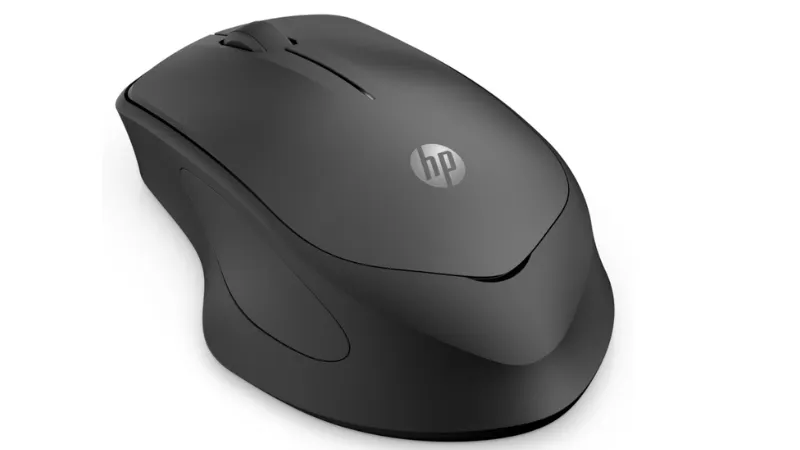
The vertical mouse and trackball both address wrist pain by changing the mechanics of how you use a mouse. The HP 280 takes a different approach — it keeps the familiar mouse format and reduces the physical effort required to use it.
The click buttons actuate with less force than a standard mouse button. Over hundreds of clicks a day, that reduction in finger pressure can feed into less forearm tension — one of the factors that contributes to wrist discomfort during long sessions.
It won’t correct posture or eliminate wrist movement, but for users whose pain is driven more by grip tension and click fatigue than by how the mouse sits on the desk, it addresses the right problem.
There’s a second effect: a loud, sharp click tends to make the whole hand tense and grip the mouse harder, almost as a flinch. A quieter, softer click removes that prompt, and the grip on the shell loosens — which eases the static tension that builds across the hand during sustained mouse use, separate from the force of any single click.
Pros:
- Contoured ergonomic shape comfortable for extended use
- Reduced-force silent clicks lower finger and grip tension across consecutive hours of mouse work
- Plug-and-play setup via USB nano receiver — no software required
- Tracks well on most surfaces
- Lightweight with smooth movement
- Works across Windows, macOS, and Chrome OS
- 2-year manufacturer guarantee
Limitations:
The silent claim needs a realistic expectation set around it. HP’s own specification states 90% noise reduction — the clicks are noticeably quieter than a standard mouse, but they are still audible. The most consistent complaint is that users expected silence and got something closer to a muffled click.
For shared spaces or open-plan environments where genuine quiet matters, that’s worth knowing before buying.
Hand size is the other practical consideration. Multiple reviewers describe the mouse as suited to smaller hands, and medium to large hands are likely to find it uncomfortable over a full working day. If hand size is a concern, check the dimensions before committing: 11 x 7.1cm.
There’s no Bluetooth — connection is dongle-only, which can be a frustration on modern laptops with limited USB ports. The dongle itself is stored inside the battery compartment rather than the box, which has caused enough setup confusion to flag: if it appears missing on arrival, check inside the mouse before assuming there’s been a packing error.
Key Specs:
- Connection: 2.4GHz USB nano receiver (no Bluetooth)
- Battery: 1 x AA (not included); up to 18 months
- Compatibility: Windows 10/11, macOS, Chrome OS
- Hand orientation: Right-hand
- Noise reduction: 90%
Verdict:
The HP 280 is a low-friction entry point — it looks and feels like a standard mouse, works straight out of the box, and asks nothing of the user in terms of adjustment.
For someone at the earlier end of wrist and hand discomfort, or anyone not ready to commit to the learning curve of a vertical or trackball design, that’s a legitimate starting point rather than a compromise.
The silent claim is a stretch — it’s quieter clicks, not silent ones. And the size suits smaller hands better than larger ones. Both are worth checking against your own situation before buying.
What it does reliably is reduce the click tension that compounds over a long session, in a package that requires nothing more than plugging in the dongle and getting on with the day.
Check today’s price on AmazonHow to Choose an Ergonomic Mouse
The right ergonomic mouse depends on where the discomfort is coming from and how far it’s progressed. All three types above reduce strain, but they do it in different ways and suit different situations.
Wrist and forearm pain
A vertical mouse is the most targeted fix. The palm-down position that a standard mouse forces puts the forearm into sustained rotation — a vertical mouse corrects that by rotating the wrist into a handshake position, which takes the tension off the forearm and wrist directly. It’s the most natural switch from a standard mouse, and quicker to adapt to than a trackball.
Hand, finger, and arm pain
A trackball is worth considering when the problem goes beyond wrist position. Because the hand stays still and the pointer is controlled by the fingers alone, it removes the repetitive movement of mousing across a surface entirely. The adjustment period is longer, but for users whose discomfort has progressed to the point where reducing movement isn’t enough, removing it is the more effective solution.
Noise-sensitive environments
A silent ergonomic mouse addresses a different kind of strain — the grip tension and finger fatigue that builds up from repeated forceful clicking. If the wrist and forearm position feels manageable but the hand tires quickly or joints feel sore after heavy mouse use, reduced-force clicks in a mouse with a contoured shape target that specific issue without requiring any change to how the mouse is used.
Hand size and grip style
These are practical filters worth checking before committing to a particular ergonomic mouse style. The Logitech MX Vertical is right-hand only and suits medium to large hands. The Kensington Expert Mouse is fully ambidextrous with no significant hand size restriction. The HP 280 is better suited to small to medium hands — larger hands are likely to find it uncomfortable over a full working day.
If you are left-handed, or want the option to switch hands during the day to rest a sore wrist, the Kensington is the more practical choice.
- Best Ergonomic Vertical Mouse: Logitech MX Vertical
- Best Ergonomic Trackball Mouse: Kensington Expert Mouse
- Best Silent Ergonomic Mouse: HP 280 Silent
FAQs
Do ergonomic mice actually work?
For most people who use a mouse for several hours a day, yes. The evidence is strongest for reducing wrist and forearm strain — particularly with vertical and trackball designs that correct posture or remove movement entirely. Results depend on choosing the right type for the problem and giving the adjustment period a fair chance.
Are ergonomic mice good for the wrist?
They can make a significant difference, depending on the type. A vertical mouse addresses the forearm rotation that causes wrist strain directly. A trackball removes wrist movement altogether. Both have strong user evidence behind them for wrist pain relief, particularly when the problem comes from sustained daily mouse use.
Are vertical mice better for carpal tunnel?
A vertical mouse can help reduce the forearm pronation that aggravates carpal tunnel symptoms, but it isn’t a medical device. For mild to moderate symptoms, correcting wrist position through a vertical mouse is a reasonable first step. For diagnosed carpal tunnel syndrome, it’s worth combining any equipment change with advice from a GP or occupational therapist.
Does an ergonomic mouse help with tendonitis?
It can, depending on which tendon is affected and what’s aggravating it. Reducing wrist extension, forearm rotation, or repetitive clicking — which ergonomic mice address in different ways — can lower the load on inflamed tendons during a working day. It won’t treat tendonitis directly, but reducing the repetitive strain that’s contributing to it is a reasonable part of managing it.
Does an ergonomic mouse help with tennis elbow?
Tennis elbow is caused by strain on the tendons connecting the forearm muscles to the elbow, and repetitive mouse use is a recognised contributing factor. A vertical mouse reduces forearm rotation, which can lower the load on those tendons during desk work. The evidence is anecdotal rather than clinical, but it’s a commonly reported benefit among vertical mouse users dealing with lateral elbow pain.
What is the most ergonomic type of mouse?
It depends on the problem. A vertical mouse is the most targeted fix for wrist and forearm strain. A trackball is the most complete solution for users whose pain has progressed to include the hand, fingers, and arm — because it removes mouse movement entirely rather than just correcting posture. A silent ergonomic mouse suits users whose discomfort is driven more by grip tension and click fatigue than by wrist position.