
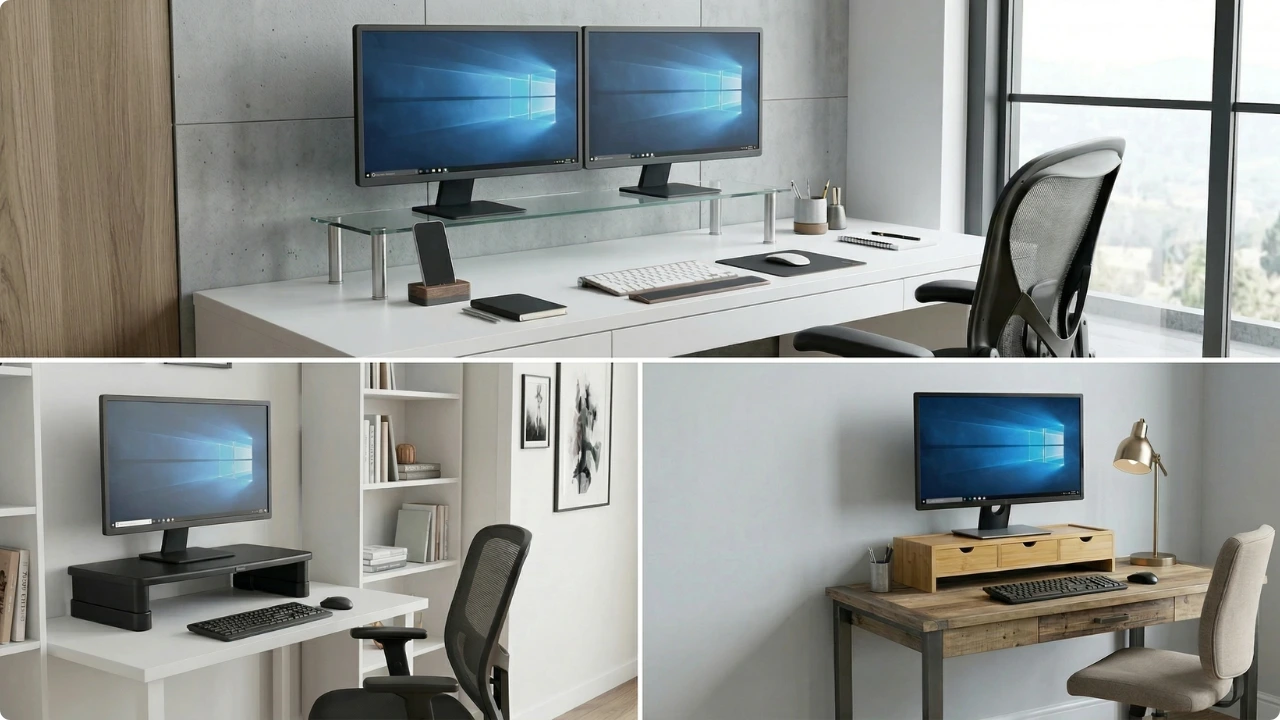
Raising your monitor shouldn’t mean sacrificing valuable desk space. Some stands even add practical storage.
Here are three solid options built for different setups…
Raising your monitor makes screen use more comfortable straight away. Most stands add extra features, but they’re only useful when they fit how your desk is actually used.
The best options go beyond simple elevation — they help free up space, reduce clutter, and make your desk work better overall.
The 3 Best Monitor Stands for Desks (UK)
Best Adjustable Monitor Stand for Desks

Amazon Basics Adjustable Monitor Riser
View on AmazonBest for:
- Small desk setups needing a modest screen lift (around 7–12 cm)
- Single monitor setups with no need for under-stand storage
- Users who prefer a set-and-forget solution over frequent adjustments
- Shared desks where a simple, fixed height works for multiple users
Why this stands out
The Amazon Basics riser keeps things simple. With three fixed height options, it gives you a straightforward way to lift your screen without introducing extra moving parts or complexity.
That simplicity works in its favour. Once set, it stays stable, with no wobble or need for readjustment — which suits everyday desk setups where you just want a consistent viewing height.
Its footprint is also relatively contained compared to wider or bulkier risers. While it won’t free up large amounts of usable space, it does create enough clearance underneath for smaller items like notebooks, stationery, or a diary — helping reduce surface clutter without overcomplicating the setup.
Pros:
- Simple three-level height adjustment — quick to set and leave in place
- Stable, no-fuss design that holds position without wobble
- Compact footprint suited to small desk setups
- Creates light clearance underneath for smaller desk items
- Reliable, widely available option at an accessible price point
Limitations
The space underneath is more limited than it first appears. While it can hold smaller desk items, it’s not wide or deep enough to neatly store a laptop or full-size keyboard in most setups, especially once cables are involved.
Height adjustment is also fairly basic. With only three fixed levels, it’s better suited to small height corrections rather than fine-tuning your screen position.
This makes it less flexible than more adjustable or open-frame designs — particularly for users trying to dial in a more precise ergonomic setup.
Key specs:
- Dimensions: 40.9 × 27.9 × 12.4 cm
- Height options: 3 levels (7.3 / 10.8 / 12.4 cm)
- Material: ABS plastic
- Load capacity: 10 kg
Verdict
The Amazon Basics riser fits more comfortably into a small desk setup than it might first appear. At just over 40 cm wide, it takes up around half the width of a typical 80 cm desk, leaving usable space either side for everyday items.
It’s best suited to straightforward setups where you don’t need precise adjustment or space to store larger items underneath. Instead, it offers a stable platform with just enough clearance for smaller desk essentials, helping keep the surface tidy without adding bulk.
While it doesn’t offer the flexibility of more adjustable or storage-focused designs, it’s a simple, stable option for a modest height boost, without adding bulk or complexity.
Check today’s price on AmazonBest Dual Monitor Stand for Desk Setups
Charles Jacobs Dual Monitor Riser
View on AmazonBest for:
- Two monitors (typically 24–32″) of similar size and weight
- Desks wide enough to accommodate a 100 cm stand
- Replacing two smaller risers with a single full-width platform
- Setups where freeing up surface space while raising both screens (~14 cm) improves usability
Why this stands out
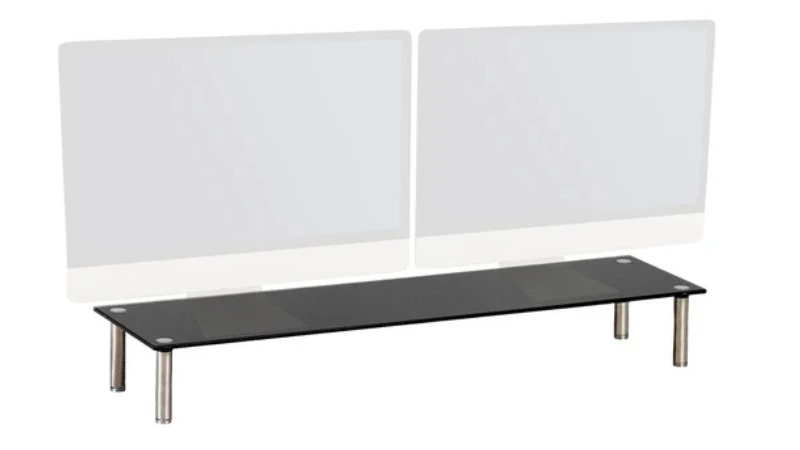
The main advantage here is width. At 100 cm, it comfortably supports two monitors side by side on a single platform, keeping both screens aligned without needing separate stands.
That width also creates a large, usable area underneath. With around 13 cm of height clearance, there’s enough room for a keyboard, mouse, or everyday desk items like notebooks and accessories, giving you space to keep less frequently used items within reach without cluttering the workspace.
Despite the extra width, it doesn’t take up as much front-to-back space as you might expect. At 25.5 cm deep, it’s slightly shallower than smaller risers like the Amazon Basics model, helping preserve usable desk space in front of your keyboard.
The glass construction adds to the overall feel. It’s sturdy under load and gives a cleaner, more open look compared to bulkier designs, which helps keep wider setups from feeling too heavy visually.
Pros:
- Wide surface comfortably fits two monitors (typically 24–32″) side by side
- Stable glass construction with strong load capacity
- Large 13 cm clearance underneath for keyboards and accessories
- Keeps both screens aligned at the same height
- Clean, minimal design that suits wider desk setups
Limitations
Despite being listed with adjustable feet, the height is effectively fixed once assembled. The small amount of adjustment is there to help level the stand on uneven surfaces, rather than to change your screen height.
Its size also means it won’t suit smaller desks. At 100 cm wide, it’s designed for wider desks and can quickly dominate more compact workspaces.
As with most glass risers, it works best when weight is evenly distributed. Placing heavier monitors unevenly or concentrating weight in one area can affect how stable it remains over its lifespan.
It’s worth noting that some user reviews mention minor assembly issues, such as threading or missing parts, though these appear to be isolated rather than common. If you’re not setting it up straight away, it’s sensible to check the contents on arrival to avoid missing the return window.
Key specs:
- Width: 100 cm
- Depth: 25.5 cm
- Height: 14 cm
- Material: Glass
- Load capacity: 20 kg (evenly distributed)*
*Weight must be evenly distributed across the full width. This stand is intended for two monitors of similar weight — uneven loading, such as a single heavy monitor, can compromise stability over time.
Verdict
At 100 cm wide, this riser stretches across most desks, creating a single platform for both monitors while allowing you to keep your keyboard on the desk and slide it neatly underneath when you need the extra space.
This helps raise both screens to a more comfortable viewing height while keeping the desk surface clearer and more organised.
The 20 kg load capacity is strong for a minimalist stand supported on four legs. It offers stability, full-width support, and usable space underneath when the weight is evenly balanced across the surface.
Check today’s price on AmazonBest Wooden Monitor Stand with Storage for Small Desks
SoBuy Bamboo Monitor Stand with Drawers
View on AmazonBest for:
- Keeping smaller desk items neatly organised and out of sight
- Compact desks where built-in storage helps reclaim valuable surface space
- Visible home workspaces where style and function matter equally
- Users who want a simple, ready-to-use stand with no assembly required
Why this stands out
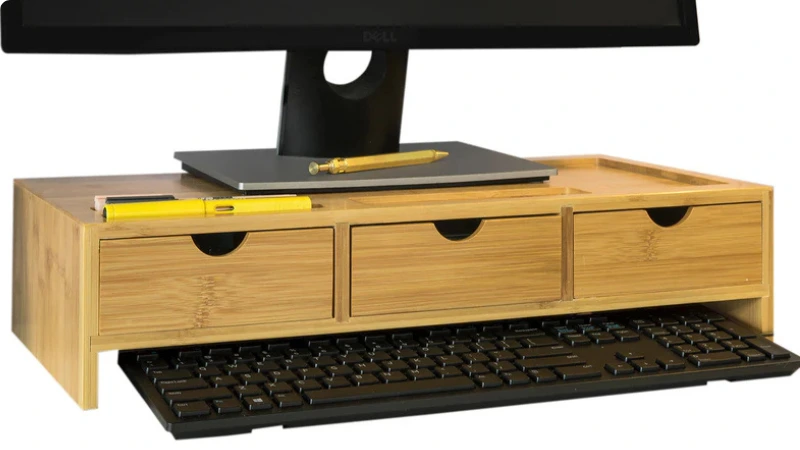
This bamboo monitor stand leans more towards home furnishing than a purely functional desk accessory. It combines a screen riser with built-in organisation, while still allowing space at the rear for basic cable routing.
The three drawers are designed for smaller desk items like stationery, loose cables, and everyday accessories, helping keep them out of sight rather than spread across the desk.
Additional surface details, including shallow grooves and a small tray section, are intended for quick-access items such as pens, phones, or notepads. These aren’t deep storage areas, but they help keep frequently used items within reach without adding visual clutter.
At 51 cm wide, it fits comfortably on smaller desks, making it well suited to compact setups. The fixed 11.5 cm height raises the screen to a more comfortable viewing level, though without the ability to fine-tune positioning.
Pros:
- Built-in drawers help keep smaller items organised and out of sight
- Compact width suits smaller desks and tighter spaces
- Clean bamboo finish gives a more furniture-style look
- Cable routing space helps reduce visible wires
- Arrives assembled and ready to use
Limitations:
The built-in storage is more limited than it first appears. While the drawers help keep smaller items out of sight, they’re relatively shallow due to the overall design and rear cable space. They’re best suited to items like stationery, paper clips, or wired earphones, rather than bulkier accessories.
The use of grooves and tray sections on the top surface also reduces the available flat area. This works well for organising smaller items, but it means the stand is better suited to monitors with a compact central base, allowing those sections to remain accessible.
Underneath clearance is also fairly limited. It can accommodate slimline keyboards or flatter items like notebooks, letters, or a diary, but bulkier keyboards are unlikely to fit neatly underneath.
Key specs:
- Dimensions: 51 x 25 x 11.5 cm
- Material: Bamboo / MDF
- Load capacity: 25 kg
- Storage: 3 drawers + surface slots
- Assembly: None (ready to use)
Verdict
At 51 cm wide, this stand fits neatly into smaller desk setups, combining screen elevation with built-in organisation without taking up unnecessary space.
A lot of thought has gone into the design, but it’s important to set expectations based on the available space rather than the number of drawers or surface features. The storage is best suited to smaller items and works well when paired with a monitor that has a compact base.
Where it stands out is in raising your screen to a comfortable height while keeping everyday items within reach but out of sight, helping maintain a cleaner, more organised desk.
Check today’s price on AmazonWhich Monitor Stand Is Right for You?
The best monitor stand fits comfortably on your desk while leaving enough space in front for everyday use. Extra features can help, but only when they match how your setup is actually used.
- For a single monitor or shared desk, an adjustable stand offers simple, flexible height control
- For two monitors on a wider desk, a full-width stand keeps both screens aligned while freeing up space underneath
- For monitors of different sizes or weights, separate stands provide more stable support
- For compact desks that tend to become cluttered, a stand with built-in storage helps keep smaller items organised
- For laptop setups with an external keyboard, check both width and depth — some stands won’t fully support larger laptop bases
- Best Adjustable Monitor Riser: Amazon Basics
- Best Dual Monitor Riser: Charles Jacobs
- Best Wooden Monitor Riser: SoBuy Bamboo Stand
FAQs
Are monitor risers worth it?
Yes — if you need to raise your screen by a fixed amount.
A monitor stand (or riser) works best when your screen needs to be lifted by around 7–14 cm to reach a more comfortable viewing height. It’s a simple way to improve posture, but fixed height stands won’t always suit users who need precise height adjustment.
What height should I put my monitor?
Your screen should be positioned so your gaze is slightly downward, not straight ahead.
A good guide is a neutral head position with a gentle downward viewing angle of around 10–20° (roughly a 90–110° neck angle). This usually places the top of the screen at or just below eye level. If your chair height can’t be adjusted, choose a stand height that avoids tilting your head up or down for long periods.
Is it better to have your monitor higher or lower?
Slightly lower is usually better than slightly too high.
Think of the difference between reading a book and working at a screen. Reading tends to involve a steeper downward angle, while screen work should keep your head more neutral, with only a slight downward gaze. Positioning your monitor just below eye level helps maintain that balance without tilting your head up.
What size of monitor stand do I need?
Choose a stand based on your monitor’s base size, not the screen size.
The stand should fully support the footprint of the base and keep the weight centred over its support points. Wider or heavier monitors need more stable platforms, while compact bases can sit comfortably on smaller stands.
Check both width and depth, and consider where the stand’s legs or supports sit — placing weight closer to those points helps improve stability, especially on glass or designs with support legs rather than full base support.
Can a monitor stand hold two monitors?
Yes — but dual monitor stands are designed for even weight distribution.
This usually means using two monitors that are similar in size and weight, positioned evenly across the stand. If your setup is uneven or off-centre, separate stands are often the more stable option.
Are monitor arms better than risers?
Monitor arms are better for flexibility, while risers are better for simplicity.
Arms let you fine-tune height, tilt, and position, while risers provide a fixed, stable platform that works well for dedicated setups, rather than shared desks where different users may need to adjust the screen height.